
Understanding how data is kept secure is an essential part of ICT and Computer Science education. Concepts such as encryption, keys, and secure communication are fundamental, yet they can often feel abstract to students when taught only through theory.
To address this, I developed a set of simple web-based tools designed to make cryptography more practical, interactive, and engaging in the classroom.
These tools allow students to work directly with encrypted data, transforming the learning experience from passive understanding into active problem-solving.
Bringing Encryption to Life
Encryption is the process of converting readable data (plaintext) into unreadable data (ciphertext) so that only authorised users can access it. While this definition is straightforward, students benefit far more from actually applying it.
Using the tools I created, students can:
- Decrypt real encrypted messages
- Create and share their own encrypted content
- Experiment with how keys are used in different systems
- Understand the importance of keeping certain information secure
This approach helps bridge the gap between theory and real-world application.
Symmetric Encryption in Practice
Symmetric encryption uses a single key for both encryption and decryption. It is fast and efficient, but requires the key to be shared securely.
With the AES tool, students can input a passphrase, encrypt a message, and then challenge others to decrypt it. This makes the concept of a “shared secret” immediately clear and meaningful.
The tool can be accessed here:
AES Encryption/Decryption Tools
Asymmetric Encryption in Practice
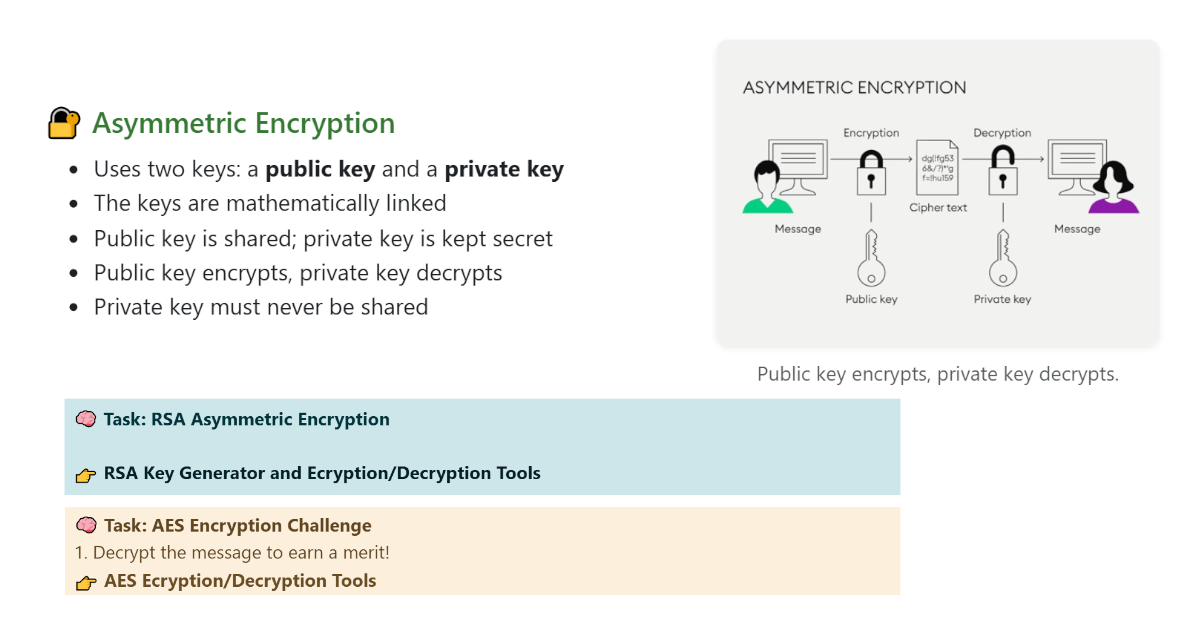
Asymmetric encryption uses two keys: a public key and a private key. The public key is shared openly, while the private key must remain secure.
Through the RSA tool, students can:
- Generate their own key pairs
- Share public keys with classmates
- Encrypt messages for others
- Decrypt messages using their private key
This simulates how secure communication works in real-world systems such as online messaging and digital security.
The tool can be accessed here:
RSA Key Generator and Encryption/Decryption Tools
A Practical Approach to Learning
These tools were created with a clear goal: to make cryptography easier to understand through direct interaction.
They can be used in both ICT and Computer Science lessons to:
- Reinforce theoretical concepts
- Support hands-on classroom activities
- Encourage collaboration between students
- Make abstract ideas more concrete and memorable
By allowing students to experiment with encryption themselves, the learning process becomes more intuitive and engaging, while still aligning with curriculum objectives.
Here is the final paragraph you can add to the end of the article:
You can try these tools yourself and explore how encryption works in practice using the following resources: AES Encryption/Decryption Tools and RSA Key Generator and Encryption/Decryption Tools.