
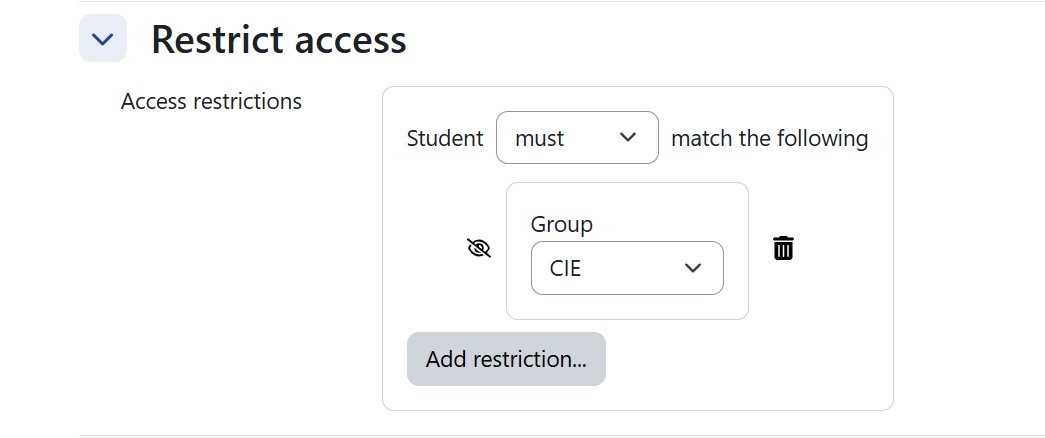
One of the most powerful but often underused features in Moodle is the ability to use groups to support differentiated instruction. By assigning students to different groups, teachers can control which content and activities are visible to each learner. This makes it possible to tailor the learning experience while keeping everything organized within a single course.
Differentiated Content with Group Restrictions
In Moodle, pages, resources, and activities can be displayed depending on the group students belong to. Using the Restrict access settings, a teacher can specify that a particular page should only be visible to a specific group.
For example:
- A support group may see additional explanation pages, examples, or scaffolded instructions.
- A core group may receive the standard lesson materials.
- An extension group may see enrichment content or advanced challenges.
This approach allows the teacher to adapt the content without creating separate courses, keeping everything centralized and easy to manage.
Adjusting Activities for Different Groups
Activities such as quizzes, assignments, and interactive tasks can also be adjusted using the same group restriction system. This means that:
- Some students may receive simpler practice activities.
- Others may receive more challenging assessments.
- Certain groups can access additional formative assessments for reinforcement.
Because these adjustments happen behind the scenes, the learning environment remains seamless for students.

Efficient and Discreet Differentiation
Using groups for differentiation offers two key advantages:
- Efficiency for teachers – All variations of content and assessment can exist within the same course structure, avoiding duplicated courses or complicated management.
- Discretion for students – Learners only see the materials intended for them, which helps avoid unnecessary comparisons between classmates.
The result is a cleaner course design that naturally adapts to different learning needs, allowing teachers to provide differentiated content and assessment in a way that feels integrated rather than separated.
When used thoughtfully, Moodle groups become a simple but powerful tool to support inclusive and personalized learning within a single course.